


DELL OPTIPLEX 7000 MFF + DELL MONITOR E2223HN BUNDLE OFFER(DELL AIO MOUNT AS GIFT)
DELL OPTIPLEX 7000 MFF
Features & Design
Operating System
Technology that revolves around you
Designed around you
Compact without compromise:With modern, flexible mounting options, the 7000 Micro blends into any workspace.
Sustainably built:Contains up to 60% post-consumer recycled materials to minimize environmental impact.
Easy Upgrades:Now easier to maintain and upgrade with tool-less access without removing the bezel.
Ready when you are: Featuring Windows Modern Standby to enable an instant on/instant off user experience with constant connectivity.
Made to work as hard as you
High-powered proficiency:OptiPlex 7000 Micro 65W is available with the latest DDR5 memory giving you the ability to handle a bigger workload.
Take on any task: Built with 12th Gen Intel® Core™ up to i9 65W CPU and new Hybrid Core technology. The OptiPlex 7000 Micro balances workloads between cores, making multitasking effortless.
High-speed access: New Wi-Fi 6E brings more bandwidth and better performance while future-proofing your IT investment.
Achieve more every day
Stay connected: Connect to the latest peripherals with USB 3.2 Gen 2×2 Type C port access.
Broaden your horizons:12th Gen Intel® Core™ integrated graphics with support for up to 4 independent displays.
See things your way:Select the monitor that fits you best with an extensive line-up from the leading monitor brand worldwide.
Dell Optimizer
Intelligence built around you: Automatically personalize and boost the performance of your system and its entire ecosystem with Dell Optimizer, an AI-based optimization software that learns and responds to the way you work.
Personalized Performance: Intelligence and machine learning elevate productivity by automatically personalizing performance features across your entire ecosystem, making them the world’s most intelligent PCs.
Intelligent Collaboration: Get the world’s most intelligent collaboration experience with smart audio conferencing, connectivity and productivity features – all in one software.
Safe, secure and manageable: We ensure optimization and data collection follows a stringent process to keep your information safe. Any data we do gather is analysed locally on your system to improve your personal PC experience.
Leader in sustainability
Deploy:Our modern deployment solution, ProDeploy in the Unified Workspace allows you to revolutionize the way deployment gets done. By spending just one hour for set up, IT can then hand deployment to Dell and have preconfigured systems shipped directly to the end users wherever they are.
Secure:Dell Endpoint Security for the Unified Workspace helps manage growing cyber risks while embracing workforce transformation. With Dell SafeGuard and Response powered by Secureworks, gain actionable insight to help quickly and efficiently prevent, detect and respond to cyber attacks keeping your environment free from harm.
Manage:We integrated our hardware management solution Dell Client Command Suite with VMware Workspace ONE, allowing you to take advantage of unified endpoint management (UEM) and manage the firmware, operating system and applications for all devices from the Workspace ONE console. UEM simplifies the management of the entire environment saving IT time from having to work between separate consoles for PCs and phones.
Support:ProSupport Plus continues to be the only predictive and proactive support in the market. When compared to key competitors, ProSupport Plus with SupportAssist reduced time to resolve a failed hard drive with up to 11x faster time to resolution.
Stay Secure, Be Productive
Start secure. Stay Secure. Organizations report a 58% drop in security incidents with Windows 11 Pro devices.
Windows 11 Pro devices help you simplify your workday and improve productivity. Switch seamlessly between locations. Blaze through your to-do list with AI-powered multitasking, features to get organized in a snap, and performance to speed demanding workloads to completion 42% faster on average.
DELL MONITOR E2223HN
Features & Design
Wide viewing angle: See your work in superb FHD clarity and get consistent views across a wide 178°/178° viewing angle.
Crisp images: Get an impressive 3000:1 contrast ratio for deeper blacks, brighter whites and vivid color.
Easy on the eyes: Enjoy a flicker-free screen with ComfortView, a software feature that reduces harmful blue light emissions. It’s designed to optimize eye comfort even over an extended viewing period.
Convenient connectivity: Connect to current and legacy systems via HDMI and VGA ports.
Maximize your desktop: Cut clutter with space-saving features like a compact stand and improved cable management that hides cables while complementing any workspace.
Clean, simple design: A slim bezel adds a modern look.
Adapts to your needs: Make your workspace your own with VESA-compatible mounts and stands.
Productive at every level: Easy Arrange allows you to easily tile multiple applications across one or more screens with 38 pre-set window partitions and the ability to personalize up to five windows, giving you improved multitasking abilities.
Seamless transitions: The auto-restore feature remembers where you left off, so applications will go back to where you left them, even after you’ve unplugged.
The key to convenience: Shortcut keys can save you even more time, letting you easily configure your display management settings so you can get to work faster.
More ways to manage: Asset management reports allow IT managers to quickly capture and track monitor information as well as configure multiple monitors at once through a single setup.
Environmental standards: This monitor meets the latest regulatory and environmental standards such as EnergyStar®, EPEAT® Gold1 and is TCO Certified.
Eco-conscious packaging: Designed with the environment in mind, Dell commercial monitors come in 100% recyclable cardboard packaging.2
Energy conservation: Save energy with PowerNap3, a feature that dims or puts your monitor to sleep when it’s not in use.
Advancing sustainability: Dell Technologies is committed to reducing environmental impact throughout the product lifecycle. Read more about our commitment to sustainability and our 2030 Social Impact goals here, and our product’s carbon footprint here.
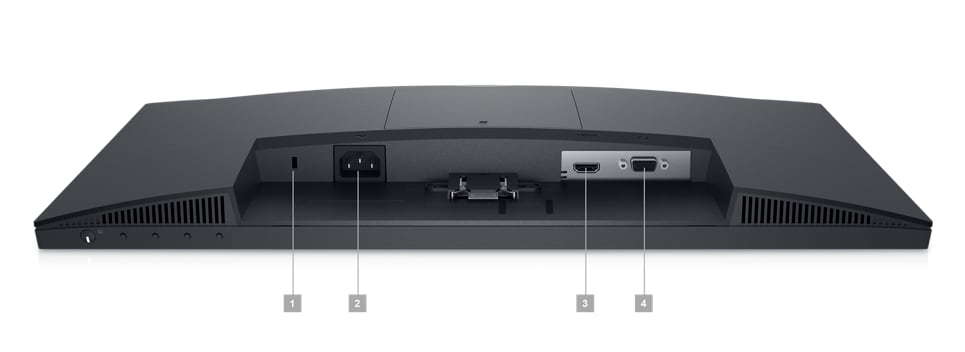
1. Security lock slot (based on Kensington Security Slot™) | 2. Power port | 3. HDMI port | 4. VGA port
Cables Included:
Power cable | HDMI cable
₨53,100.00
BUNDLE OFFER DELL OPTIPLEX 7000 MICRO FORM FACTOR PC + MONITOR DELL E2223HN, GET A DELL AIO MOUNT AS GIFT
DELL OPTIPLEX 7000
Ports & Slots
1. Power Button 2. Hard Disk Drive Activity Light 3. Line In/Out 4. Universal Audio Jack 5. USB 3.2 Gen 2 Type A with Power Share 6. USB 3.2 Gen 2×2 Type C (20Gb Data)
7. Knock-out Slot for External Wireless Antenna (optional) 8. Optional video port (HDMI 2.0b/ DisplayPort 1.4a/ VGA/ USB Type-C with DisplayPort Alt mode) 9. USB 3.2 Type A Ports (2 – one with Power On) 10. Padlock ring and Kensington security-cable slot 11. Ethernet RJ-45 12. USB 3.2 Gen 2 Type A ports (2) 13. Display Ports 1.4 (2) 14. Power adapter port
15. Knock-out Slot for External Wireless Antenna (optional) 16. Optional video port (HDMI 2.0b/ DisplayPort 1.4a/ VGA/ USB Type-C with DisplayPort Alt mode) 17. USB 3.2 Gen 1 Type A with Smart Power On 18. Padlock ring and Kensington security-cable slot 19. Ethernet RJ-45 20. USB 3.2 Gen 2 Type A ports (2) 21. DisplayPort 1.4 ports (3) 22. Power adapter port
Dimensions & Weight
2. Depth: 7.00 in. (178.00 mm)
Weight: 2.06 lb. (0.94 kg)
Tech Specs
-
Processor
12th Generation Intel® Core™ i5-12400 (18 MB cache, 6 cores, 12 threads, 2.50 GHz to 4.40 GHz, 65 W) -
Operating System(Dell Technologies recommends Windows 11 Pro for business)
Windows 11 Pro, 64-bit -
Graphics Card
Intel® UHD Graphics -
Memory *
8 GB, 1 x 8 GB, DDR4, 3200 MHz, single-channel -
Hard Drive
M.2 2230, 256 GB, PCIe NVMe Gen3 x4, SSD, Class 35
DELL MONITOR E2223HN
Display
- Diagonal Viewing Size
54.48 cm (21.45 inches)Horizontal
478.66 mm (18.84 inches)Vertical
260.28 mm (10.25 inches)Maximum Preset Resolution
1920 x 1080 at 60 HzAspect Ratio
16:9Pixel Pitch
0.249 mm x 0.241 mmPixel Per Inch (PPI)
103Brightness
250 cd/m² (typical)Color Support
Color gamut (typical):
72% (CIE1931)
83% (CIE1976)Color depth:
16.7 MillionContrast Ratio
3000:1 (typical)Viewing Angle
178°/178°Response Time
10 ms typical (Normal)
5 ms typical (Fast)Panel Type
VA (Vertical Alignment)Display Screen Coating
Anti-GlareBacklight Technology
LEDComfortView with Flicker-free screen
YesDell Display Manager Compatibility
YesRemote Asset Management
Yes, via Dell Command I MonitorGSA/TAA
NoOptional Soundbar
NoAdjustability
Tilt Only (-5° to 21°)Flat Panel Mount Interface
VESA (100 mm)
Connectivity
- Connectors
1 X VGA
1 X DisplayPort 1.2
1 X HDMI 1.4HDCP Support
HDMI HDCP 1.2
Security
- Security lock slot (cable lock sold separately)
Dimensions & Weight
- Dimensions (with stand)
Height 384.17 mm (15.12 inches)
Width 504.2 mm (19.85 inches)
Depth 171.00 mm (6.73 inches)Weight (panel only – for VESA mount/ no cables)
2.26 kg (4.98 lb)Weight (monitor and cables with stand)
3.04 kg (6.70 lb)Weight (with packaging)
4.14 kg (9.13 lb)
Power
- AC input voltage/frequency/current
100 VAC to 240 VAC / 50 Hz or 60 Hz ± 3 Hz / 1.5 A (typical)Power Consumption (Operational)
0.3 W (Off Mode)
0.3 W (Standby Mode)
12.13 W (On Mode)
19 W (Max)Power Consumption Stand by/Sleep
Less than 0.3 W
Support Services
- Standard Service Plan
3 Years Advanced Exchange Service and Limited Hardware WarrantyOptional Service Plan
Dell ProSupport
In The Box
- Components
Monitor with standCables
Power cable
1 X HDMI Cable
1 X VGA Cable (EMEA and Japan only)
1 X VESA screw coverDocumentation
Quick Setup Guide
Safety and regulatory information
Related products



DELL VOSTRO 3910 – CI5 12TH GEN (CPU ONLY)
Original price was: ₨43,000.00.₨38,880.00Current price is: ₨38,880.00.